 damian_site
The last two posts were about making the terminal my main workplace: tmux, Neovim, lazygit, and a theme I can comfortably look at all day. The other program now permanently open in that setup is Pi, a coding agent I have been using for the last month.
I like it a lot, mostly because it starts from a different premise than the big coding-agent products: the harness is not a fixed product feature. It is something you can assemble.
Pi still gives you the essential agent loop, a terminal UI, sessions, model selection, and tools for reading, editing, writing, and running commands. But it deliberately stays small. Extensions, skills, prompt templates, model configuration, themes, and MCP servers are all things you choose to add. That matters more to me than it sounded like it would.
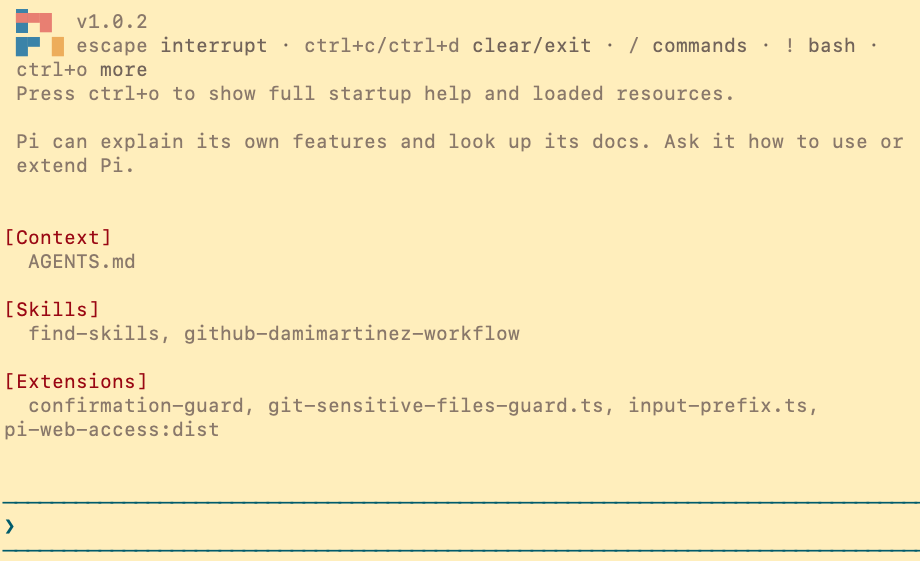
A smaller default context is a feature
With an opinionated coding agent, you usually receive a lot at once: built-in instructions, a fixed approval system, integrations you may not use, and product-specific behaviour that is always part of the conversation. That can be convenient, but it also means carrying context and complexity that may not fit the way you work.
Pi lets me begin with the basics and add only the things I want. My global configuration is deliberately small right now: a model choice, a theme, a few extensions, and two skills. I have only been using Pi for a month, so this is the beginning of a setup, not its final form.
That small start has taught me something useful: models alone are already very capable. For most tasks I do not need a heavy harness, a long list of extensions, or a capability for every imaginable workflow. A smaller environment feels faster and easier to reason about because I know what is in it and why it is there. I will certainly add more skills and extensions over time, but I want each one to earn its place.
This is not an argument that every agent needs to be configured from scratch. A ready-made harness is a good trade-off when you want to be productive immediately. But if you spend hours a day with an agent, being able to shape the surrounding workflow becomes a real advantage.
There is a cost angle too. Context is not free when you use a metered model. A leaner setup means I am not automatically loading instructions and capabilities that are irrelevant to the task in front of me. It is not magic, and the actual cost depends on the provider and model, but having control over what gets loaded is useful.
Model choice without choosing a new workflow
Another big reason I moved to Pi is that it is not tied to one model vendor. I can use hosted providers, API keys, compatible endpoints, and local models, then switch models without changing the agent interface or the workflow I have built around it.
For example, I use OpenAI Codex through my existing ChatGPT subscription. Pi’s /login flow lets me authenticate with the subscription and use the available Codex models without separately buying OpenAI API credits for that workflow. I can still use an API-backed model or a local model when that makes more sense.
The obvious comparison is Anthropic’s Claude Code subscription, another popular way to access a strong coding model. Pi can authenticate with a Claude account, but I would not treat that as equivalent to using Claude Code itself through its subscription. Pi warns that Anthropic subscription authentication in a third-party harness may use paid extra usage rather than the plan’s included limits. In practice, that means I would expect to pay for API-style usage or extra usage and check the billing category carefully, instead of assuming a Claude Code subscription covers Pi in the same way that my ChatGPT/Codex subscription does.
That separation is refreshing: Pi is the agent environment; the model is a choice inside it.
Pi can help build Pi
Pi is open source and MIT licensed, so the implementation and extension API are there to inspect. More importantly for day-to-day use, Pi has enough documentation and self-knowledge that I can describe a workflow in plain English and ask it to build the missing piece.
An extension is TypeScript that runs inside Pi and can register commands, tools, event handlers, UI components, or providers. A skill is lighter weight: a directory with a SKILL.md file that gives the agent specialized instructions only when they are relevant. Both are easy to inspect because they are just local files.
Over the last month, I have been using that idea rather than waiting for a feature request to land upstream. Here are the pieces Pi helped me build.
My skills: instructions that load when needed
I currently have only two global skills. That is intentional for now: I am still learning what I actually repeat often enough to deserve a reusable workflow, rather than installing a huge library just because it exists.
Finding skills instead of reinventing them
The first is find-skills. When I ask whether there is already a skill for a job, it searches the open Agent Skills ecosystem with npx skills find, presents the relevant options, and can install one when I decide to use it.
It is a small thing, but it is a good example of progressive disclosure. I do not need a long list of package-manager instructions in every session. Pi sees the skill’s name and short description at startup, then reads the full workflow only when I ask about extending its capabilities.
A GitHub workflow tailored to how I work
The second is github-damimartinez-workflow. It turns my preferred Git hygiene into an explicit procedure: work on a task branch, start from an up-to-date default branch, check the GitHub identity, keep commits focused, scan staged content with Gitleaks before committing, scan outgoing history before pushing, and create a pull request.
That gives the agent the context it needs to work in my repositories without having to repeat the workflow every time. It also avoids a common failure mode with coding agents: doing the technically correct change but handling the repository carelessly.
My extensions: executable workflow rules
Skills explain a process. Extensions enforce or automate one. These are the extensions I have added so far.
Confirmation guard
The confirmation guard asks before any file write or edit, shell command that is not clearly read-only, installation command, or git push. Its shell classifier allows simple inspection commands such as ls, rg, and git status to run without getting in the way, while treating unknown or complex shell syntax conservatively.
The point is not to pretend it is a sandbox. It is a visible pause before an agent changes a file, installs something, or reaches outside my machine. I can disable it for a session when I deliberately want an uninterrupted implementation loop, but the default is to ask.
Git secret guard
This is the extension I am happiest about. It intercepts git commit and git push commands issued through Pi and fails closed unless Gitleaks passes.
Before a commit, it checks the staged paths, rejects sensitive file types such as .env files and private-key formats, and scans the exact staged content. Before a push, it checks tracked paths and scans the outgoing Git history. It also blocks common escape hatches: --no-verify, unsafe aliases and wrappers, compound commit commands, and staging-plus-committing in the same command.
The scanner output is fully redacted, and there is no in-session bypass. That is intentional. I asked for a guard that protects the moment where an accidental secret becomes permanent Git history, not one that can be clicked away when it is inconvenient.
A tiny input-prefix extension
Not every extension needs to be complicated. One of mine changes the editor component to render a bold ❯ before my prompt, while keeping that character out of the message actually sent to the model.
It is purely cosmetic, but it makes Pi feel at home in my terminal setup. More importantly, it was a very small TypeScript extension, which made the extension API feel approachable rather than like a framework I need to learn before I can customize anything.
A Gruvbox Light Pi theme
In the previous post I made Terminal.app, tmux, Neovim, and Claude Code agree on a Gruvbox Light palette. Pi gets the same treatment through a JSON theme: background, borders, status states, Markdown, syntax colours, diffs, and each thinking level all map to the same palette.
Again, this is not essential to coding. But the agent is now part of the terminal environment I stare at for hours, so being able to make it consistent matters. The theme is just a file in my Pi configuration, not a feature request or a workaround.
Community packages: borrow what already works
The extension API is not only for things I build myself. Pi packages bundle extensions, skills, prompt templates, and themes so the community can distribute a whole capability through npm or Git. The package gallery is a good place to browse them, and installing one is as simple as:
pi install npm:<package-name>
The one I have installed is pi-web-access. It adds web search and content extraction, so Pi can research a current question, fetch a readable page, inspect a GitHub repository, or work with PDFs and videos when the task needs it. It is useful, but it is also a good example of the philosophy here: it is available when I need it, not an opaque feature that I have to accept as part of a much larger default harness.
There are already packages for workflows I am interested in but have not installed yet. pi-subagents, for example, can delegate tasks to isolated child Pi sessions with their own contexts and configurations. pi-mcp-adapter takes a token-conscious approach to MCP: instead of loading every connected MCP tool definition into context up front, it exposes discovery and starts servers only when they are needed.
That ecosystem means I can choose between installing a proven community solution, adapting one, or writing the narrow extension that fits my workflow. As with any code that runs inside an agent with access to my machine, I read the source before installing a package.
The trade-off: you own the harness
The flexibility comes with responsibility. Pi extensions run with the permissions of the local user, so I only load code I trust. A custom safety extension is only as good as the assumptions in its implementation. And when I build my own workflow, I have to maintain it.
For me, that is a good trade. The default is not a giant black box. I can read it, replace it, or leave it out. When something feels missing, I can first ask: is this a skill, an extension, a prompt template, or simply a habit I should keep myself?
Next: making a fleet of agents manageable
The next thing I want to add is much more ambitious: a set of skills and extensions for managing subagents and multiple Pi sessions. The goal is a workflow where I can interact with a fleet of agents, see what they are doing, and move between their sessions without leaving the terminal interface I already use.
That is still a work in progress, but it is the best preview of why I like Pi. I do not need to wait for a vendor to decide that my preferred way of coordinating agents is worth building. I can start with a small workflow, let it prove itself, and turn the parts that help into reusable Pi capabilities.
After a month, Pi has become the coding agent that best fits the rest of my terminal setup. It is free and open source, works with the models I choose, and gives me a clean base rather than a fixed idea of how an agent should work. The best part is that it lets the workflow evolve with me.
Like this content? Subscribe to my newsletter to receive more tips and tutorials about AI, Data Engineering, and automation.