I wanted to try ChromaDB and see how easy it is to use and how easily you can plug it into an agent or any other flow to build a RAG.
Chroma is an AI-native open-source vector database: everything you need to get started is built in, and it runs on your machine.
ChromaDB can handle embeddings itself: you attach an embedding function to a collection, and Chroma embeds documents when you add them and embeds queries when you search. No manual embed-then-store pipeline.
I built a small demo around a Pokémon TCG card collection: we extract structured data from card images with a Gemini VLM (reusing the structured output from images idea from my previous post), chunk it, throw it into Chroma (which does the embedding via Gemini under the hood), and then use a Google ADK agent with a retrieval tool to answer questions. The notebook runs in Google Colab.
The main takeaway: Chroma is straightforward. You create a collection with an embedding function, add documents (text + ids + metadata), and query with text. Then you can call that from an agent, a CLI, or any RAG pipeline.
Here’s the flow:
- Load card images and encode them for the VLM
- Extract card data with Gemini (vision + structured JSON)
- Chunk each card’s JSON for better retrieval
- ChromaDB: create a collection with a Gemini embedding function and add documents (Chroma embeds automatically)
- Retrieve by passing query text (Chroma embeds the query and searches)
- ADK agent with a tool that queries ChromaDB and answers from retrieved context
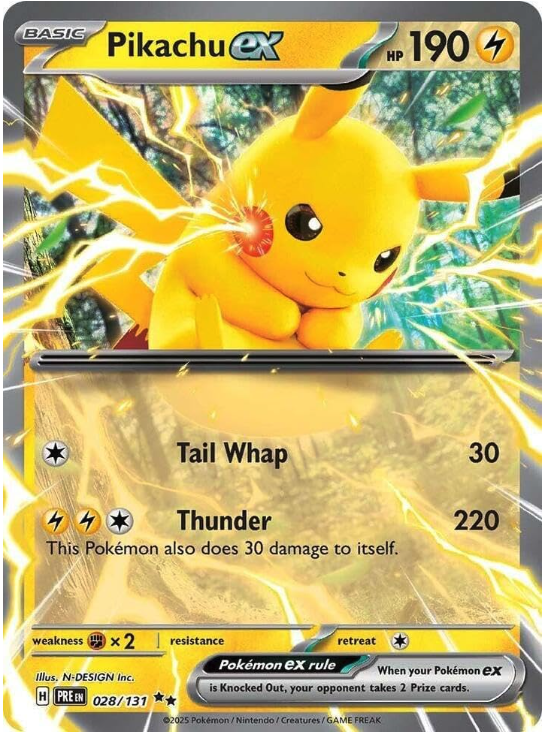
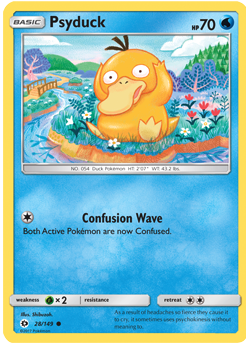
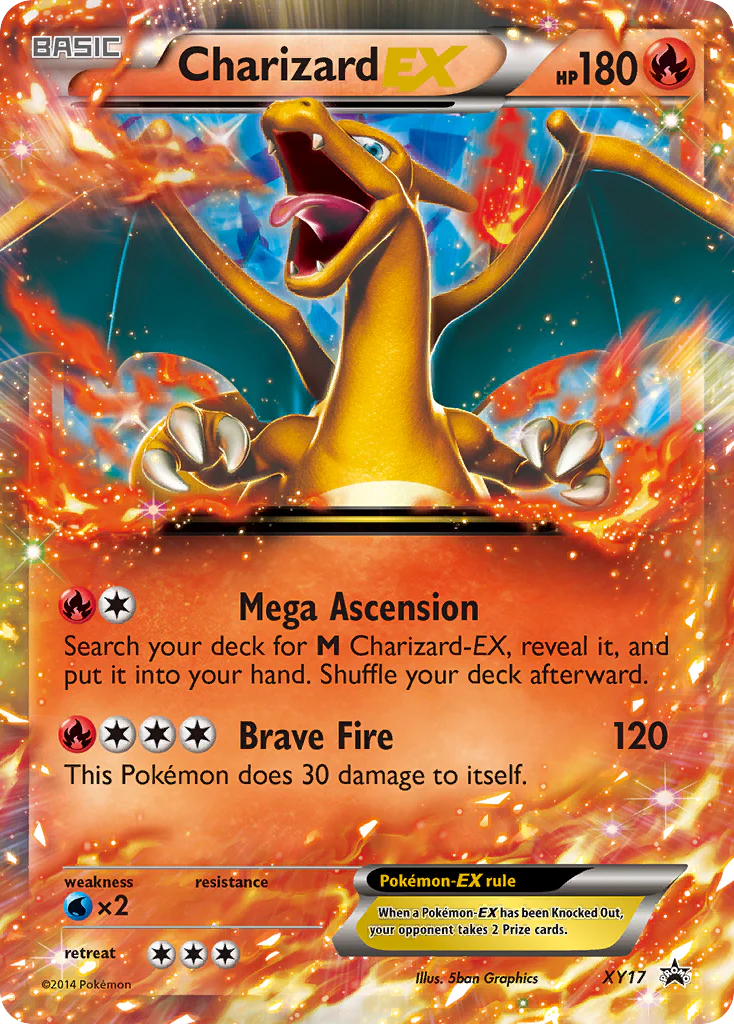
Below I use three cards: Pikachu, Psyduck, and Charizard.
1. Setup and loading card images
We load card images, convert them to base64 for the VLM, and keep (path, pil_image, base64) for the extraction step:
import os
import base64
from pathlib import Path
from io import BytesIO
from typing import List, Dict, Any, Optional

from pydantic import BaseModel, Field
from PIL import Image

CARD_IMAGE_PATHS = [
    Path("pikachu_card.png"),
    Path("psyduck_card.png"),
    Path("charizard_card.png")
]

def image_to_base64(img: Image.Image) -> str:
    buf = BytesIO()
    img.save(buf, format="PNG")
    return base64.b64encode(buf.getvalue()).decode("utf-8")

loaded_cards: List[tuple] = []  # (path, pil_image, base64)
for path in CARD_IMAGE_PATHS:
    if not path.exists():
        continue
    pil_image = Image.open(path).convert("RGB")
    b64 = image_to_base64(pil_image)
    loaded_cards.append((path, pil_image, b64))
2. VLM: extract card info to JSON
We use Gemini as a vision model to read each card and return structured data (no OCR). A Pydantic schema gives us consistent JSON (see Gemini structured output):
from google import genai
from google.genai import types

client = genai.Client()

class Attack(BaseModel):
    name: str = Field(description="Name of the attack.")
    cost: Optional[List[str]] = Field(default=None, description="Energy cost as list of symbols.")
    damage: Optional[str] = Field(default=None, description="Damage dealt.")
    effect: Optional[str] = Field(default=None, description="Effect text of the attack, if any.")

class PokemonCard(BaseModel):
    name: str = Field(description="The Pokemon's species name only (e.g. 'Pikachu').")
    type: Optional[str] = Field(default=None, description="Element type, e.g. Lightning, Water, Fire.")
    hp: Optional[int] = Field(default=None, description="HP value.")
    stage: Optional[str] = Field(default=None, description="Stage, e.g. Basic, Stage 1.")
    description: Optional[str] = Field(default=None, description="Flavor text or ability description.")
    attacks: List[Attack] = Field(default_factory=list, description="List of attacks on the card.")
    weakness: Optional[str] = Field(default=None, description="Weakness, e.g. 'Fighting x2'.")
    resistance: Optional[str] = Field(default=None, description="Resistance, if any.")
    retreat_cost: Optional[int] = Field(default=None, description="Retreat cost (number).")
    illustrator: Optional[str] = Field(default=None, description="Illustrator name if visible.")
    set_info: Optional[str] = Field(default=None, description="Set name or number if visible.")

POKEMON_CARD_EXTRACT_PROMPT = """Analyze this Pokemon TCG card image and extract all visible information.
Fill in every field you can read; use null for anything not present on the card."""

def extract_card_with_schema(image_base64: str, prompt: str) -> PokemonCard:
    image_bytes = base64.b64decode(image_base64)
    image_part = types.Part.from_bytes(data=image_bytes, mime_type="image/png")
    response = client.models.generate_content(
        model="gemini-2.5-flash",
        contents=[prompt, image_part],
        config={
            "response_mime_type": "application/json",
            "response_json_schema": PokemonCard.model_json_schema(),
        },
    )
    return PokemonCard.model_validate_json(response.text)

all_cards_data: List[tuple] = []
for path, _pil, b64 in loaded_cards:
    card_model = extract_card_with_schema(b64, POKEMON_CARD_EXTRACT_PROMPT)
    all_cards_data.append((path, card_model))
We then build (source_id, card_json) per card and chunk with a unique source_id (e.g. pikachu_pikachu_card) so chunk IDs are unique across cards.
3. Chunking for retrieval
We split each card into semantic chunks (basic info, description, each attack, stats, misc) so retrieval can return only the relevant part:
def chunk_card_json(data: Dict[str, Any], source: str = "card") -> List[Dict[str, Any]]:
    """Split card JSON into semantic chunks (one per top-level key or logical group)."""
    chunks = []
    base = {"source": source}

    # Basic info
    basic = {k: data[k] for k in ("name", "type", "hp", "stage") if k in data and data[k] is not None}
    if basic:
        chunks.append({
            "chunk_id": f"{source}_basic",
            "chunk_type": "text",
            "text": " | ".join(f"{k}: {v}" for k, v in basic.items()),
            "metadata": {**base, "section": "basic"},
        })

    if data.get("description"):
        chunks.append({
            "chunk_id": f"{source}_description",
            "chunk_type": "text",
            "text": str(data["description"]),
            "metadata": {**base, "section": "description"},
        })

    # Attacks (one chunk per attack)
    attacks = data.get("attacks") or []
    for i, a in enumerate(attacks):
        parts = [f"Attack: {a.get('name', '')}"]
        if a.get("cost"):
            parts.append(f"Cost: {a['cost']}")
        if a.get("damage"):
            parts.append(f"Damage: {a['damage']}")
        if a.get("effect"):
            parts.append(f"Effect: {a['effect']}")
        chunks.append({
            "chunk_id": f"{source}_attack_{i}",
            "chunk_type": "text",
            "text": " | ".join(parts),
            "metadata": {**base, "section": "attack", "index": i},
        })

    # Weakness, resistance, retreat
    extra = {k: data[k] for k in ("weakness", "resistance", "retreat_cost") if k in data and data[k] is not None}
    if extra:
        chunks.append({
            "chunk_id": f"{source}_stats",
            "chunk_type": "text",
            "text": " | ".join(f"{k}: {v}" for k, v in extra.items()),
            "metadata": {**base, "section": "stats"},
        })

    # Set / illustrator
    misc = {k: data[k] for k in ("illustrator", "set_info") if k in data and data[k] is not None}
    if misc:
        chunks.append({
            "chunk_id": f"{source}_misc",
            "chunk_type": "text",
            "text": " | ".join(f"{k}: {v}" for k, v in misc.items()),
            "metadata": {**base, "section": "misc"},
        })
    return chunks

# Build card_chunks from all_cards_for_chunking
card_chunks: List[Dict[str, Any]] = []
for source_id, card_json in all_cards_for_chunking:
    card_chunks.extend(chunk_card_json(card_json, source=source_id))
4. ChromaDB: let it handle embeddings
This is where ChromaDB shines. You don’t call an embedding API yourself and pass vectors. You give the collection an embedding function (here, Chroma’s built-in Google Generative AI one). Chroma uses it to embed documents when you add and to embed the query when you query. For more on collections and embedding functions, see Chroma’s Manage Collections docs. Use chromadb.PersistentClient(path="...") instead of Client() if you want your data saved on disk and available across multiple runs.
!pip install chromadb

import chromadb
import chromadb.utils.embedding_functions as embedding_functions

COLLECTION_NAME = "pokemon_cards"

# Chroma will use this to embed both documents (on add) and queries (on query)
google_ef = embedding_functions.GoogleGenerativeAiEmbeddingFunction(
    api_key=os.getenv("GOOGLE_API_KEY") or os.getenv("GEMINI_API_KEY")
)

chroma_client = chromadb.Client()
# Or use chromadb.PersistentClient(path="/path/to/db") to save data on disk across runs
collection = chroma_client.get_or_create_collection(
    name=COLLECTION_NAME,
    embedding_function=google_ef,
)
To add documents, you pass text (and ids + metadatas). Chroma calls the embedding function for you:
# Chroma embeds documents automatically via the collection's embedding_function
existing = collection.get(ids=[c["chunk_id"] for c in card_chunks])
existing_ids = set(existing.get("ids", []))

to_add = [c for c in card_chunks if c["chunk_id"] not in existing_ids and c.get("text", "").strip()]
if to_add:
    for chunk in to_add:
        cid = chunk["chunk_id"]
        text = chunk["text"].strip()
        meta = {"chunk_type": chunk.get("chunk_type", "text"), **chunk.get("metadata", {})}
        for k, v in list(meta.items()):
            if v is None or (isinstance(v, (list, dict)) and not v):
                meta.pop(k, None)
            elif not isinstance(v, (str, int, float, bool)):
                meta[k] = str(v)
        collection.add(documents=[text], ids=[cid], metadatas=[meta])

print(f"Added {len(to_add)} new chunks to ChromaDB.")
No embeddings= argument; just documents, ids, and metadatas. ChromaDB does the rest.
5. Retrieval: query with text
To search, you pass query text. Chroma embeds it with the same embedding function and returns the nearest chunks:
def query_card_db(question: str, top_k: int = 3, threshold: float = 0.2):
    # Chroma embeds the query using the collection's embedding_function
    results = collection.query(
        query_texts=[question],
        n_results=top_k,
        include=["documents", "metadatas", "distances"]
    )
    docs = results["documents"][0]
    metas = results["metadatas"][0]
    dists = results["distances"][0]
    ids_list = results.get("ids")
    ids = ids_list[0] if ids_list else [None] * len(docs)

    print(f"Query: {question}\n" + "=" * 60)
    for i, (text, meta, dist, cid) in enumerate(zip(docs, metas, dists, ids)):
        sim = 1 - dist
        if sim < threshold:
            continue
        print(f"  [{i+1}] similarity={sim:.3f} | {cid}")
        preview = (text or "")[:120] + ("..." if len(text or "") > 120 else "")
        print(f"      {preview}\n")
    return results

query_card_db("What is Pikachu's HP and type?")
query_card_db("What attacks does Psyduck card have and how much damage?", top_k=5)
So: add with text, query with text. ChromaDB keeps the embedding logic in one place (the collection’s embedding function).
6. RAG with an ADK agent (or anything else)
You can now use this retrieval from any consumer: an agent, a script, a CLI. Here we expose it as a tool for a Google ADK agent, so the agent can search the card collection and answer from retrieved context only:
from google.adk.agents import Agent
from google.adk.runners import Runner
from google.adk.sessions import InMemorySessionService
from google.genai import types
import asyncio

def retrieve_card_context(question: str, top_k: int = 10) -> dict:
    """
    Searches the Chroma collection of stored Pokemon cards and returns relevant chunks.
    Use this to answer questions about which cards are in the collection.
    """
    results = collection.query(
        query_texts=[question],
        n_results=top_k,
        include=["documents", "metadatas"],
    )
    docs = results["documents"][0]
    metas = results.get("metadatas", [[]])[0] if results.get("metadatas") else []
    parts = []
    for text, meta in zip(docs or [], metas or []):
        source = (meta or {}).get("source", "card")
        parts.append(f"[{source}]\n{text}")
    context = "\n\n".join(parts) if parts else "No relevant context found."
    return {"context": context, "status": "success"}

rag_agent = Agent(
    model="gemini-2.5-flash",
    name="pokemon_card_rag",
    instruction=(
        "You answer questions about the Pokemon TCG cards stored in the Chroma collection. "
        "Always use the retrieve_card_context tool with the user's question to search the collection. "
        "Answer based only on the retrieved context: name specific cards, attacks, types, etc. "
        "If the context does not contain the answer, say so clearly (e.g. 'None of the stored cards match that.')."
    ),
    tools=[retrieve_card_context],
)

# Session and Runner setup, then:
# call_agent("Do I have any pokemon that knows Thunder attack?")
# call_agent("What attacks does Charizard card have and how much damage?")
# call_agent("What pokemon card has more HP?")
The tool just calls collection.query(query_texts=[question], ...) and formats the results. The same function could be used by a non-agent RAG pipeline (e.g. a simple “ask your docs” script).
Example answers from the three cards:
-
“Do I have any pokemon that knows Thunder attack?”
Yes, the Pikachu card knows the Thunder attack. - “What attacks does Charizard card have and how much damage?”
The Charizard card has two attacks:- Mega Ascension: No damage; search your deck for M Charizard-EX, reveal it, and put it into your hand.
- Brave Fire: 120 damage, but Charizard also does 30 damage to itself.
- “What pokemon card has more HP?”
Pikachu has 190 HP, Charizard has 180 HP, and Psyduck has 70 HP. Pikachu has the most HP.
Summary
ChromaDB is easy to use: you attach an embedding function to a collection, then add and query with text. No manual embedding calls. You can then wire that into an agent (like the ADK example), a CLI, or any RAG flow.
In this demo we used:
- Gemini VLM to extract structured card data from images (same idea as the document-understanding post)
- Semantic chunking of card JSON for better retrieval
- ChromaDB with
GoogleGenerativeAiEmbeddingFunctionso Chroma handles embeddings on add and on query - A Google ADK agent with a retrieval tool that queries ChromaDB and answers from retrieved context
The full notebook is in this repository. It’s set up for Google Colab (e.g. GOOGLE_API_KEY from Colab secrets). You can adapt it for other embedding providers or other “document” sources. For more on ChromaDB: Manage Collections, Embedding Functions, and Google Gemini embedding.
If you prefer video, I also walk through this same example in a Spanish-language YouTube video: watch the video.
Like this content? Subscribe to my newsletter for more tips and tutorials on AI, Data Engineering, and automation.