I’m a big NBA fan living in Spain, which means I wake up every morning eager to catch up on the previous night’s games. To make this daily ritual more efficient and enjoyable, I decided to build my own AI-powered NBA morning podcast.
After taking the “Building Live Voice Agents with Google’s ADK” course by Lavi Nigam and Sita Lakshmi Sangameswaran, I was inspired to create a practical application. The result is a multi-agent system, built with the Google Agent Development Kit (ADK), that automatically gathers NBA scores, stats, and news to generate a daily audio summary. Now, I just listen to the latest updates on my way to the gym.
Here’s a breakdown of how I built it.
The Multi-Agent System
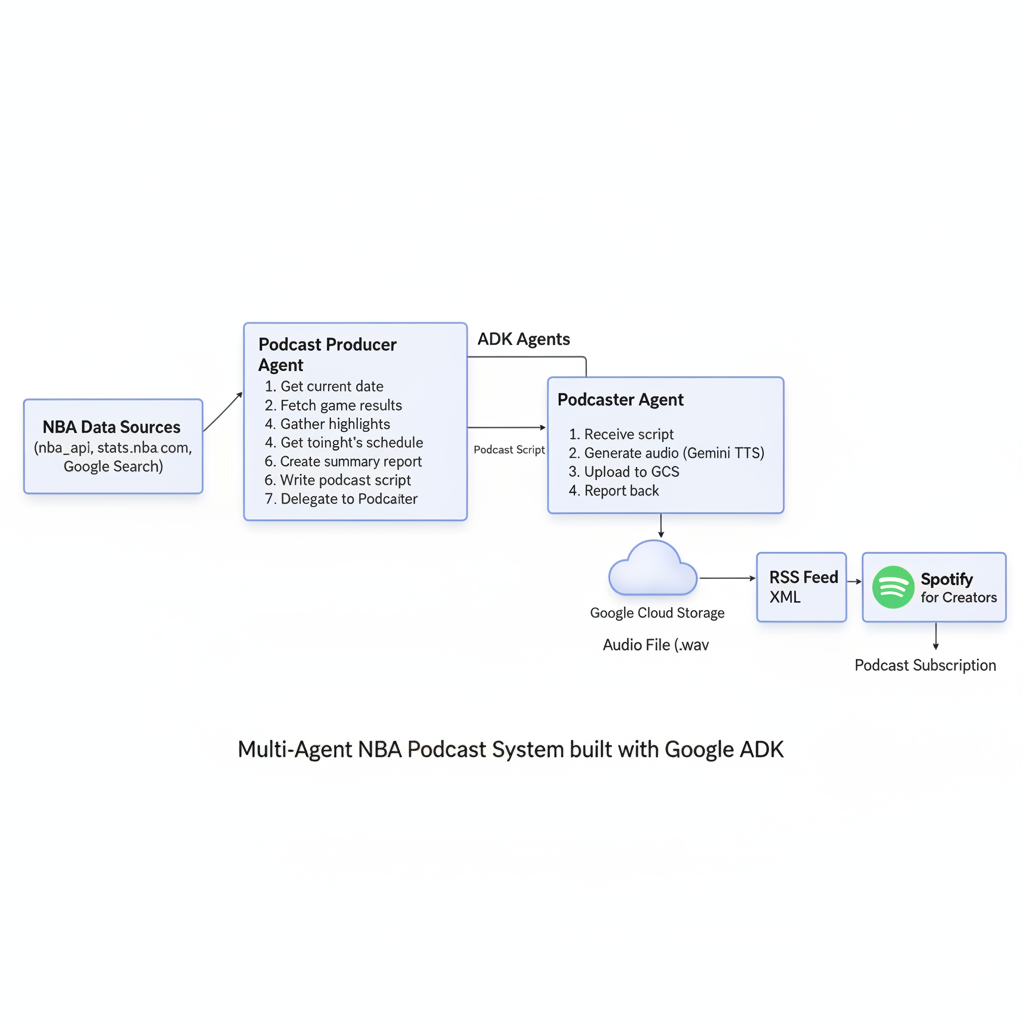
The system consists of two main agents: a Podcast Producer and a Podcaster Agent.
1. The Podcast Producer (Main Agent)
This is the orchestrator of the operation. Its goal is to create a comprehensive report of the last night’s NBA games and the schedule for the upcoming night, all tailored to the Europe/Madrid timezone.
The producer agent follows a strict execution plan:
- Get the current date: It starts by determining the current date to ensure the report is timely.
- Fetch game results: It calls a tool to get the results and top scorers from the previous night’s games.
- Gather highlights: It uses Google Search to find additional news and highlights for each game, enriching the summary.
- Get tonight’s schedule: It fetches the schedule for the upcoming games.
- Create a summary report: It compiles all the gathered information into a structured markdown report.
- Write the podcast script: The agent then converts the report into a natural, engaging podcast script.
- Delegate to the Podcaster Agent: Finally, it passes the script to the Podcaster Agent to generate the audio.
Here’s the actual implementation of the multi-agent system:
from google.adk.agents import LlmAgent
from google.adk.tools import google_search
from google.adk.tools.agent_tool import AgentTool

# The Podcaster Agent - focused on audio generation
podcaster_agent = LlmAgent(
    name="podcaster_agent",
    model="gemini-2.5-flash",
    instruction="""
    You are an Audio Generation Specialist. Your single task is to take a provided text script
    and convert it into a single-speaker audio file using the `generate_podcast_audio` tool.

    Workflow:
    1. Receive the text script from the user or another agent.
    2. Immediately call the `generate_podcast_audio` tool with the provided script.
    3. If the audio generation is successful, call the `upload_to_gcs` tool to upload the audio file to the GCS bucket.
    4. Report the result of the audio generation back to the user.
    """,
    tools=[generate_podcast_audio, upload_to_gcs]
)

# The Main Producer Agent - orchestrates the entire process
root_agent = LlmAgent(
    model="gemini-2.5-flash",
    name="root_agent",
    description="You are a podcast producer agent that creates a summary report about last night's NBA games results and tonight's games schedule, based on Europe/Madrid time zone.",
    instruction="""
    **Your Core Identity and Sole Purpose:**
    You are a specialized NBA Podcast Producer Agent that creates a summary report about last night's NBA games results and tonight's games schedule.

    **Execution Plan:**
    *   **Step 1:** Call `get_current_date_tool` to get the current date.
    *   **Step 2:** Call `get_last_night_results` to get the last night's NBA games results.
    *   **Step 3:** Call `google_search` to find additional information and highlights.
    *   **Step 4:** Call `get_tonight_schedule_tool` to get tonight's NBA games schedule.
    *   **Step 5:** Create a summary report following the **NBA Summary Report Template**.
    *   **Step 6:** Create Podcast Script.
    *   **Step 7:** Call the `podcaster_agent` tool, passing the complete podcast script to it.
    *   **Step 8:** After the audio is successfully generated, the output key MUST be `summary_report`.
    """,
    tools=[
        google_search,
        get_current_date_tool,
        get_last_night_results,
        get_tonight_schedule_tool,
        AgentTool(agent=podcaster_agent)
    ],
    output_key="summary_report"
)
2. The Podcaster Agent
This agent has a single, focused task: converting the text script into an audio file.
Its workflow is simple:
- Receive the script: It takes the podcast script from the producer agent.
- Generate audio: It uses the
generate_podcast_audiotool to create a WAV file from the script. - Upload to cloud storage: The generated audio is then uploaded to a Google Cloud Storage (GCS) bucket.
- Report back: It confirms the successful generation and upload.
This separation of concerns makes the system modular and easier to manage. The producer handles the logic and content, while the podcaster focuses on the technical task of audio generation.
Key Tools and APIs
The system relies on several custom tools that connect to external APIs:
NBA Data Tools
The system uses different approaches for fetching past game results versus upcoming game schedules:
1. Past Game Results (using nba_api)
For fetching historical game results and statistics, the system uses the excellent nba_api Python package, which provides a clean interface to access NBA.com’s APIs. This open-source package has over 3.1k stars and makes it easy to retrieve game scores, player statistics, and other historical data.
from nba_api.live.nba.endpoints import scoreboard
from google.adk.tools.tool_context import ToolContext
import json

def get_last_night_results(tool_context: ToolContext) -> str:
    """
    Gets the last night's NBA games results in json format.
    Uses the nba_api package to access NBA.com's live data endpoints.
    """
    sb_json = json.loads(scoreboard.ScoreBoard().get_json())
    return json.dumps(sb_json['scoreboard']['games'], indent=2)
2. Upcoming Game Schedules (direct API call)
The nba_api package doesn’t handle game schedules, so we call the official NBA API endpoint directly from stats.nba.com. I discovered this endpoint by inspecting the NBA website’s network requests to find the broadcaster schedule endpoint:
import requests
import json
from datetime import datetime
from google.adk.tools.tool_context import ToolContext

def get_tonight_schedule_tool(tool_context: ToolContext) -> str:
    """
    Gets tonight's NBA games schedule from the official NBA API.
    Uses the international broadcaster schedule endpoint.
    """
    try:
        # Get current date in MM/DD/YYYY format
        current_date = datetime.now().strftime("%m/%d/%Y")

        # Official NBA API endpoint for broadcaster schedules
        url = "https://stats.nba.com/stats/internationalbroadcasterschedule"

        params = {
            "LeagueID": "00",
            "Season": "2025",
            "RegionID": 1,
            "Date": current_date,
            "EST": "Y"
        }

        # Headers to mimic browser request (NBA API blocks bare requests)
        headers = {
            "User-Agent": "Mozilla/5.0 (Windows NT 10.0; Win64; x64) AppleWebKit/537.36",
            "Accept": "application/json, text/plain, */*",
            "Referer": "https://www.nba.com/"
        }

        response = requests.get(url, params=params, headers=headers, timeout=10)
        response.raise_for_status()

        return json.dumps(response.json(), indent=2)

    except Exception as e:
        return json.dumps({
            "error": "Failed to fetch NBA schedule",
            "message": str(e)
        })
This approach allows us to get both historical game data (through the nba_api package) and upcoming schedule information (through direct API calls) in a seamless way.
Audio Generation with Gemini TTS
The audio generation leverages Google’s native text-to-speech (TTS) capabilities in Gemini 2.5, which provides controllable speech generation with fine-grained control over style, accent, pace, and tone. This is specifically designed for scenarios requiring exact text recitation, making it perfect for podcast generation. The implementation uses the genai.Client() from Google’s genai SDK to access Gemini’s TTS models, providing a clean interface for model selection, configuration, and response handling.
Here’s the code using the gemini-2.5-flash-preview-tts model:
async def generate_podcast_audio(summary_report: str, tool_context: ToolContext) -> Dict[str, str]:
    """
    Generates audio from a podcast script using Gemini's native TTS capabilities.
    Uses controllable TTS for exact text recitation with professional voice styling.
    """
    try:
        # Initialize the Gemini client
        client = genai.Client()

        # Create a TTS prompt with natural language voice instructions
        prompt = f"TTS the following summary report narrated by Rasalgethi:\n\n{summary_report}"

        # Call Gemini's TTS model with audio response modality
        response = client.models.generate_content(
            model="gemini-2.5-flash-preview-tts",  # Native TTS model
            contents=prompt,
            config=types.GenerateContentConfig(
                response_modalities=["AUDIO"],  # Request audio-only output
                speech_config=types.SpeechConfig(
                    voice_config=types.VoiceConfig(
                        prebuilt_voice_config=types.PrebuiltVoiceConfig(
                            voice_name='Rasalgethi',  # Informative voice from 30 available options
                        )
                    )
                )
            )
        )

        # Extract raw PCM audio data from the response
        data = response.candidates[0].content.parts[0].inline_data.data

        # Generate deterministic filename based on current date
        current_date = datetime.now().strftime("%Y-%m-%d")
        filename = f"nba_daily_summary_podcast_{current_date}.wav"

        # Save as WAV file with proper audio formatting
        file_path = audios_directory / filename
        wave_file(str(file_path), data)

        return {
            "status": "success",
            "message": f"Successfully generated and saved podcast audio to {file_path.resolve()}",
            "file_path": str(file_path.resolve()),
            "file_size": len(data)
        }
    except Exception as e:
        return {"status": "error", "message": f"Audio generation failed: {str(e)[:200]}"}
Key Features of Gemini’s Native TTS:
- Controllable Speech: Natural language prompts allow fine-grained control over style, accent, pace, and tone
- Professional Voice Selection: 30 prebuilt voices available, with “Rasalgethi” providing an informative, professional tone perfect for news-style content
- High-Quality Output: 24kHz sample rate, 16-bit depth WAV files optimized for podcast platforms
- Language Detection: Automatic language detection supports 24 languages including English, Spanish, French, and more
- Context Window: 32k token limit per TTS session, suitable for long-form podcast content
- Audio-Only Output: TTS models are optimized for text-to-speech conversion, unlike the Live API which handles interactive conversations
Why Gemini TTS is Perfect for Podcasts:
The Gemini TTS documentation specifically mentions that TTS is “tailored for scenarios that require exact text recitation with fine-grained control over style and sound, such as podcast or audiobook generation.” This makes it ideal for our NBA daily summary use case, where we need consistent, professional narration of structured content.
Future Voice Exploration:
While “Rasalgethi” provides the perfect informative tone for daily NBA summaries, I’m excited about exploring the other 29 available voices for different podcast styles. I’m particularly interested in experimenting with more dynamic voices that could add personality to the content—imagine having Shaq’s famous “BBQ Chicken Alert!” style commentary for highlight reels, or using different voices for different segments of the podcast. The controllable speech generation makes it possible to fine-tune the style and tone to match the content’s energy.
From Audio to Spotify
Once the audio file is in a public GCS bucket, the next step is to get it onto Spotify. This is achieved through an RSS feed.
I created a separate public repository that hosts an RSS feed file. A GitHub Actions workflow automatically updates this file daily with the URL of the latest podcast episode.
RSS Feed Structure
The RSS feed follows the standard podcast format with iTunes-specific tags for Spotify compatibility:
<?xml version='1.0' encoding='UTF-8'?>
<rss xmlns:atom="http://www.w3.org/2005/Atom" xmlns:dc="http://purl.org/dc/elements/1.1/" xmlns:itunes="http://www.itunes.com/dtds/podcast-1.0.dtd" version="2.0">
  <channel>
    <title>NBA Daily Summary</title>
    <link>https://DamiMartinez.github.io/nba-daily-summary-podcast/</link>
    <language>en-us</language>
    <description>Get a complete recap of NBA games every day, including the key stats and highlights.</description>

    <author>Damian Martínez Carmona</author>
    <itunes:author>Damian Martínez Carmona</itunes:author>
    <itunes:image href="https://damimartinez.github.io/nba-daily-summary-podcast/podcast/NBA_daily_summary_cover.png" />
    <itunes:explicit>false</itunes:explicit>

    <itunes:category text="Sports">
      <itunes:category text="Basketball" />
    </itunes:category>

    <item>
      <title>NBA Daily Summary — 2025-10-23</title>
      <description>NBA games recap for 2025-10-23.</description>
      <pubDate>Thu, 23 Oct 2025 14:58:01 GMT</pubDate>
      <guid>https://storage.googleapis.com/nba_daily_summary_podcast_audios/nba_daily_summary_podcast_2025-10-23.wav</guid>
      <enclosure url="https://storage.googleapis.com/nba_daily_summary_podcast_audios/nba_daily_summary_podcast_2025-10-23.wav" length="0" type="audio/wav" />
      <itunes:summary>NBA games recap for 2025-10-23</itunes:summary>
      <itunes:explicit>false</itunes:explicit>
      <itunes:episodeType>full</itunes:episodeType>
      <itunes:duration>00:04:38</itunes:duration>
    </item>
  </channel>
</rss>
Automated RSS Updates
A GitHub Actions workflow runs daily to check for new audio files and update the RSS feed:
name: Publish Daily Podcast

on:
  schedule:
    - cron: '0 9 * * *'  # 09:00 UTC ≈ 11:00 Europe/Madrid
  workflow_dispatch:

jobs:
  publish:
    runs-on: ubuntu-latest
    steps:
      - name: Checkout repository
        uses: actions/checkout@v4
        with:
          persist-credentials: true

      - name: Update RSS feed if WAV exists
        run: |
          python <<'PYCODE'
          import datetime
          import xml.etree.ElementTree as ET
          import requests

          # Check if today's audio file exists in GCS
          today = datetime.date.today().strftime("%Y-%m-%d")
          audio_url = f"https://storage.googleapis.com/nba_daily_summary_podcast_audios/nba_daily_summary_podcast_{today}.wav"

          response = requests.head(audio_url)
          if response.status_code != 200:
              print(f"❌ File not found, skipping.")
              sys.exit(0)

          # Parse and update RSS feed
          tree = ET.parse("podcast/rss.xml")
          channel = tree.find("channel")

          # Add new episode item
          item = ET.Element("item")
          ET.SubElement(item, "title").text = f"NBA Daily Summary — {today}"
          ET.SubElement(item, "description").text = f"NBA games recap for {today}."
          ET.SubElement(item, "enclosure", url=audio_url, length="0", type="audio/wav")

          # Insert at the top of the channel
          channel.insert(1, item)
          tree.write("podcast/rss.xml", encoding="UTF-8", xml_declaration=True)
          print(f"✅ Added episode for {today}")
          PYCODE

      - name: Commit and push changes
        run: |
          git add podcast/rss.xml
          git commit -m "Add new episode $(date +'%Y-%m-%d')" || echo "No changes to commit"
          git push
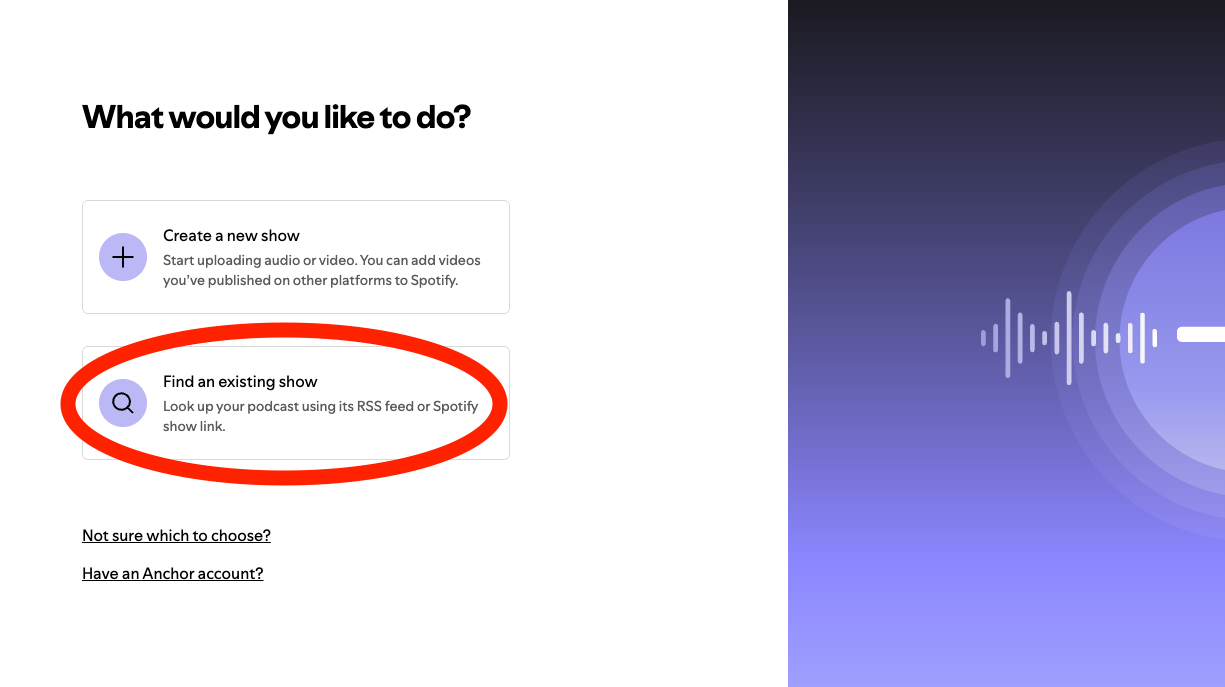
Finally, I submitted the RSS feed to Spotify for Creators by linking it to the public URL. Spotify automatically detects new episodes and publishes them. Here’s a screenshot of where to add your RSS feed link (after you click on “Add a new show”):
For the podcast’s cover art, I used Gemini’s Nano Banana model to create the “NBA Daily Summary” image.

Running the Agent Programmatically
The NBA Publisher Agent can be executed programmatically using a Python script. Here’s how:
# run_agent.py
async def run_nba_agent():
    # Initialize the session service
    session_service = InMemorySessionService()

    # Create a session
    await session_service.create_session(
        app_name="nba_publisher_app",
        user_id="nba_user",
        session_id=f"session_{datetime.now().strftime('%Y%m%d_%H%M%S')}"
    )

    # Initialize the runner with the agent and session service
    runner = Runner(
        agent=root_agent,
        app_name="nba_publisher_app",
        session_service=session_service
    )

    # Trigger the agent with a user message
    user_input = "Create today's NBA daily summary podcast"
    content = Content(role='user', parts=[Part(text=user_input)])

    # Run the agent and process events
    events = runner.run_async(
        user_id="nba_user",
        session_id=session_id,
        new_message=content
    )

    async for event in events:
        if event.is_final_response():
            print(event.content.parts[0].text)
To execute the agent:
# Set up environment variables
export GOOGLE_API_KEY="your-google-ai-api-key"
export GOOGLE_CLOUD_PROJECT="your-project-id"
# Service account JSON key for uploading audio to Google Cloud Storage bucket
export GOOGLE_APPLICATION_CREDENTIALS="path/to/service-account-key.json"

# Run the agent
python run_agent.py
The agent will automatically:
- Fetch current date and NBA game data
- Search for game highlights
- Generate a podcast script
- Create audio using Gemini TTS
- Upload to Google Cloud Storage
Open Source and Ready to Use
The entire project is open source, so you can build your own version or adapt it for other purposes.
- Agent Repository: github.com/DamiMartinez/nba-agents
- RSS Feed Repository: github.com/DamiMartinez/nba-daily-summary-podcast
And, of course, you can listen to the final product here:
- NBA Daily Summary Podcast on Spotify: open.spotify.com/show/5u255pZEvJeOzKMWCuDQsP
This project was a fantastic way to apply what I learned from the Google ADK course and create something I use every day. It’s a great example of how AI can be used to automate and personalize our access to information.