Over the past few months, my workflow as a developer has changed completely.
I don’t really “write code” anymore — instead, I define tasks, let AI coding agents handle the implementation, and focus on reviewing and improving the results.
Here’s how I’ve set it up.
The Core Engine: AGENTS.md
At the center of everything is a simple file: AGENTS.md.
It’s the playbook for any AI assistant working on my projects. It describes the rules, project structure, coding standards, and overall workflow.
Before starting a task, the agent reads it and follows it. This way, no matter which coding assistant I’m using, everything stays consistent.
📌 More about AGENTS.md: agents.md
A few notes on AGENTS.md support:
- In Cursor, for version
1.5or below,AGENTS.mdonly works when placed in the root of the project. NestedAGENTS.mdfiles in subdirectories are planned for v1.6 (see Cursor docs). - In Gemini CLI, the default context file is
GEMINI.md. To make it useAGENTS.md, you need to update your.gemini/settings.jsonlike this:
{
  "contextFileName": "AGENTS.md"
}
Templates for Every Task
Alongside AGENTS.md, I keep a folder called @ai_docs/templates/.
Whenever I need a feature, bug fix, or review, I start from a template. The coding agent fills it in, creating a detailed task document that goes into @ai_docs/tasks/.
This makes sure that tasks are always clearly defined before touching any code.
The best part is that templates improve over time. Whenever the AI makes a mistake, I loop back and update the template so it won’t happen again. The more I use the system, the more accurate it becomes.
My Role: From Coder to Reviewer
Instead of writing code line by line, my role now looks like this:
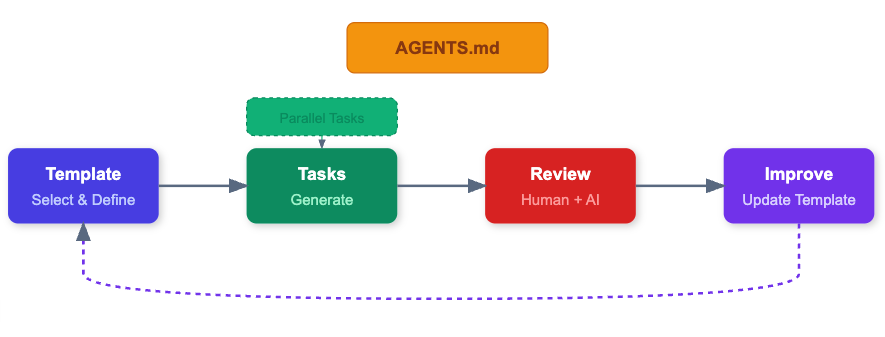
- Define a task using a template.
- Let the agent generate the task doc and code.
- Review, correct, and update the template if needed.
I use Cursor and the Gemini CLI for the actual implementation and reviews, but the process is always the same.
This shift has freed me up to focus on architecture, design, and quality assurance instead of syntax and boilerplate.
Parallel Tasks = More Productivity
Another big change: I’m no longer stuck doing one thing at a time.
- While one agent is preparing a task doc, I can define another.
- While code is being generated for one feature, I can review another.
- Everything runs in parallel, and I just keep moving between tasks.
That alone makes me multiple times more productive.
Double-Check Review
To make sure the quality is there, I always do a double-check:
- One agent (like Cursor) writes the solution.
- I review it.
- A second agent (like Gemini) reviews the same code.
That second pass usually adds small but important improvements and makes the final result more solid.
Agent-Agnostic by Design
Since the rules live in AGENTS.md and tasks are based on templates, the workflow doesn’t depend on a specific tool.
Anyone can clone the repo, use their preferred coding assistant, and get the same consistent process.
Workflow Diagram
Here’s a simplified view of the process:
Where This Came From
I actually got this idea from this YouTube video.
Most of what I do (about 85%) comes from that video’s template + task system. The only extra thing I added is the AGENTS.md layer, which makes the whole setup more standardized and easier to scale.
Conclusion
Shifting from coder to orchestrator has made me:
- more productive (parallel tasks)
- more accurate (templates improve over time)
- more consistent (agent-agnostic setup)
- and more reliable (double-check reviews)
If you’d like me to share sample templates, AGENTS.md, or task files, just send me a DM on LinkedIn or email me (address is on my website).
I might even publish some examples in a future post.